> ## Documentation Index
> Fetch the complete documentation index at: https://blaxel-pm-2441-firewall.mintlify.site/llms.txt
> Use this file to discover all available pages before exploring further.
# Custom models deployment
> Deploy custom AI models on Blaxel and manage the full life-cycle of model deployments, including versioning, scaling, and rollout in production.
As a natively serverless and distributed serving infrastructure, Blaxel lets you bring any model trained externally and serve them on Global Inference Network, whether they are public models, or private fine-tuned models. For each model deployment, an [inference endpoint](../Overview) is generated by Blaxel for consumers to invoke inference requests.
Models can be deployed using either Blaxel’s APIs, CLI, console; or using our Kubernetes controller.
## How model deployment works
### Introduction
Blaxel is a cloud-native infrastructure platform that is natively **serverless**. Any AI workload pushed to Blaxel is run in response to requests without requiring provisioning or management of serving/inference servers or hardware. It automatically scales compute resources and you pay only for the compute time used.
Blaxel is also natively **distributed.** By default, all workloads (such as an AI model processing inference requests for example) run across multiple execution locations, that can span over multiple geographic areas or cloud providers, in order to optimize for ultra-low-latency or other strategies. This is accomplished by decoupling this execution layer from a data layer made of a smart distributed network that federates all those execution locations.
### Models and deployments
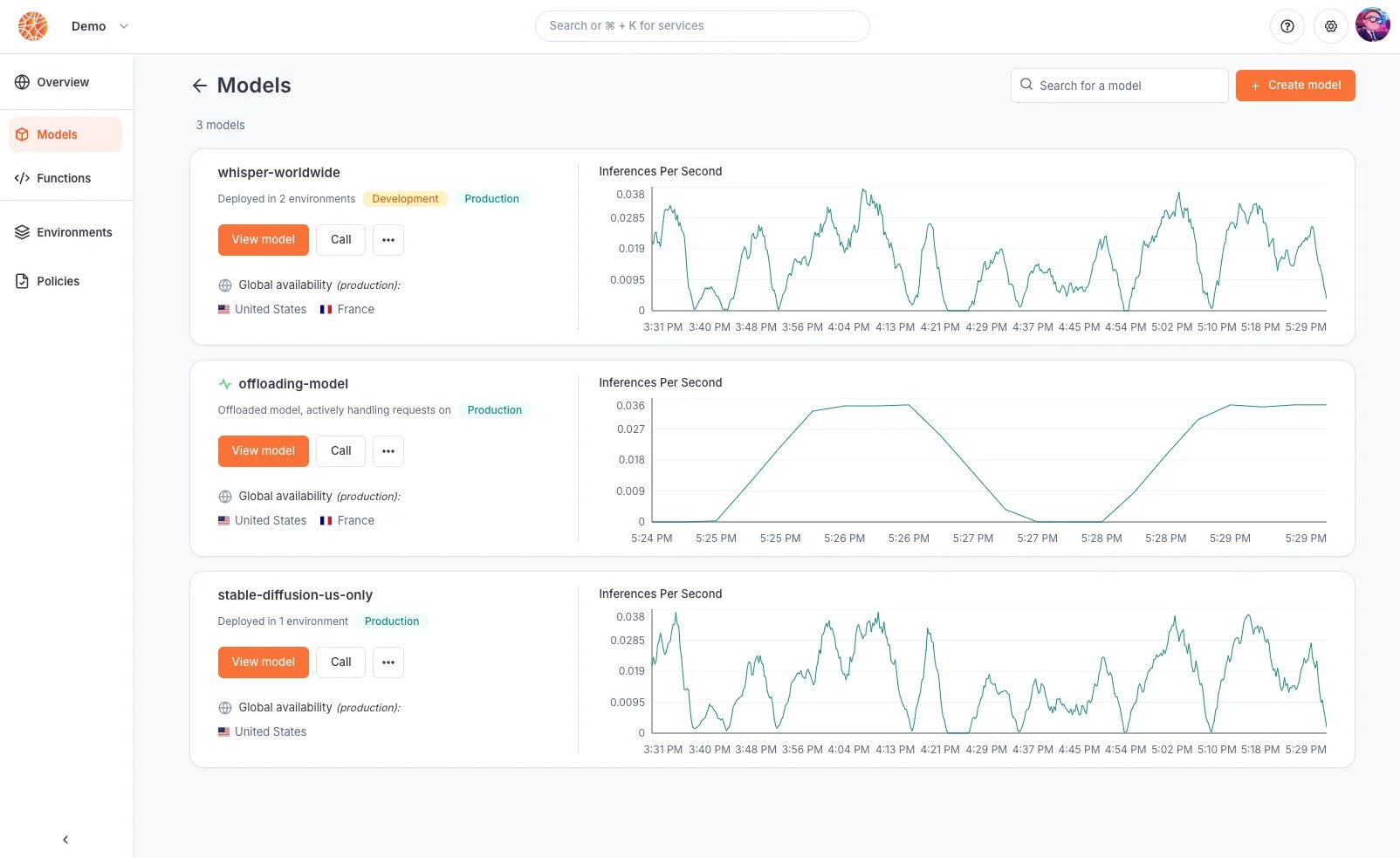
Blaxel model deployment works using two conceptual entities: **models** and **deployments**.
* **Models** are the base logical entity labeling an AI model throughout its life-cycle. A model can be instantiated into multiple deployments over different environments. This effectively lets you run multiple versions of the model at the same time, each on a different environment.
* **Deployments** (a.k.a model deployments) are the instantiation of one model version over one specific [environment](../Model-Governance/Environments). For example, you can have a *deployment* XYZ of *model* ABC on the *production environment*.
* **Executions** (a.k.a inference executions) are ephemeral invocations of model deployments by a [consumer](/Models/Query-a-model). Because Blaxel is serverless, a model deployment is only materialized onto one of the execution locations when it actively receives and processes requests. Workload placement and request routing is fully managed by the Global Inference Network, as defined by your [environment policies](../Model-Governance/Environments).
A model can be uploaded into Blaxel from a variety of [origins](#model-origins). At this moment, it can be either: **just** **created** (a *model deployment* exists but it is deactivated), or **created and deployed** (as a *model deployment*). At any time, you can [deactivate a model deployment](/Models/Model-deployment), and [update it with a new version](/Models/Model-deployment).
 ## Deployment life-cycle
### Deploying a model
Deploying a model will create the associated [model deployment](/Models/Model-deployment). At this time:
* it is [reachable](/Models/Query-a-model) through a specific endpoint
* it does not consume resources [until it is actively being invoked and processing inferences](/Models/Query-a-model)
* its deployment/inference policies are governed by the associated [environment](../Model-Governance/Environments)
* its status can be monitored either on the console or using the CLI/APIs
## Deployment life-cycle
### Deploying a model
Deploying a model will create the associated [model deployment](/Models/Model-deployment). At this time:
* it is [reachable](/Models/Query-a-model) through a specific endpoint
* it does not consume resources [until it is actively being invoked and processing inferences](/Models/Query-a-model)
* its deployment/inference policies are governed by the associated [environment](../Model-Governance/Environments)
* its status can be monitored either on the console or using the CLI/APIs
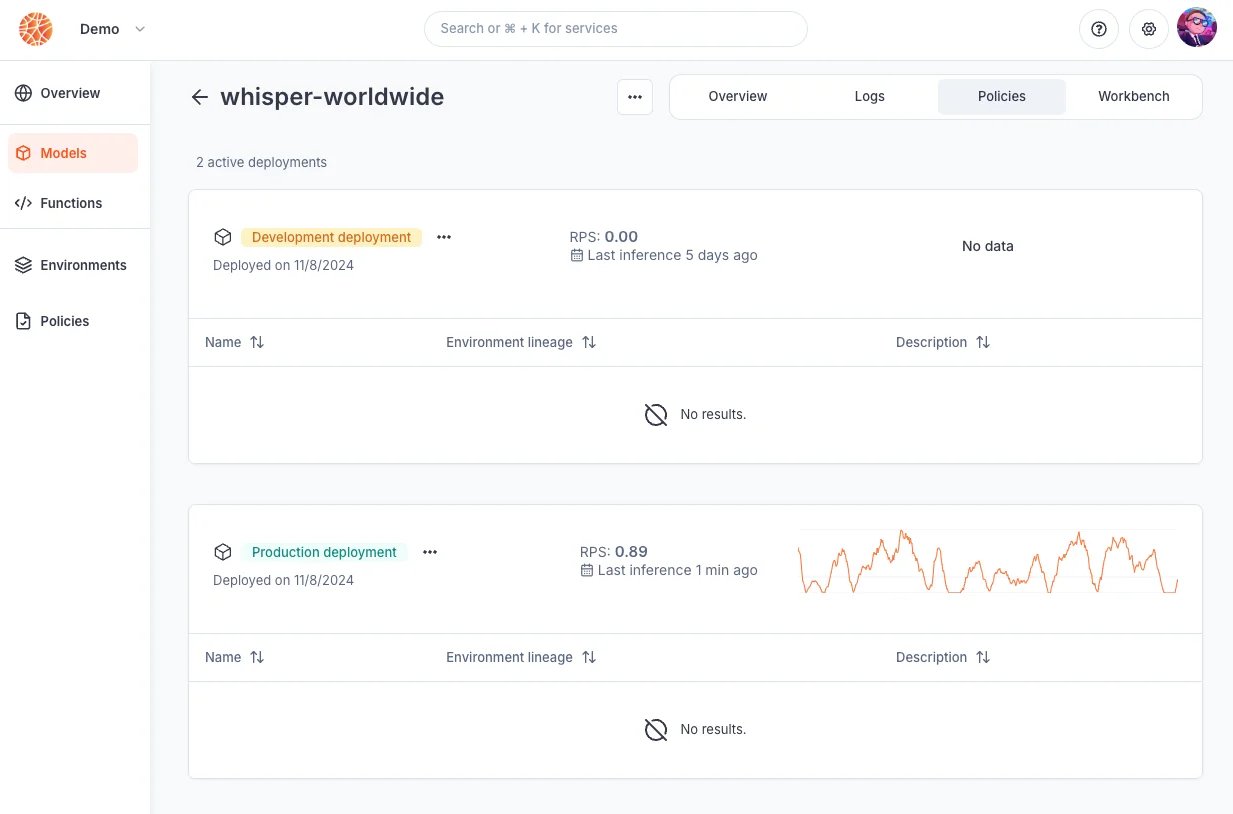 Deploy a model by running the following [CLI](https://docs.blaxel.ai/cli-reference/bl_apply) command:
```bash theme={null}
bl apply -f ./my-model-deployment.yaml
```
Read our [reference for model deployments](https://docs.blaxel.ai/api-reference/models/create-or-update-model-deployment). Models can also be deployed using the Blaxel console, and the Blaxel Kubernetes controller.
Deploy a model by running the following [CLI](https://docs.blaxel.ai/cli-reference/bl_apply) command:
```bash theme={null}
bl apply -f ./my-model-deployment.yaml
```
Read our [reference for model deployments](https://docs.blaxel.ai/api-reference/models/create-or-update-model-deployment). Models can also be deployed using the Blaxel console, and the Blaxel Kubernetes controller.
 ### Updating a model version
As you iterate on software development, you will need to update the version of a model that is currently deployed and used by your consumers.
One way to manage this is through multiple [environments](../Model-Governance/Environments), and [releasing](/Models/Model-deployment) the model version that is on one environment (e.g. development) to another environment (e.g. production). Another more straightforward way is to directly update a model deployment on an environment.
When updating a model deployment, you can:
* update the underlying model file/origin
* update the inference runtime for the model
* update the policies directly attached to the model deployment
Model deployments are updated following a **blue-green** paradigm. The Global Inference Network will wait for the new version to be completely up and ready before routing inference requests to the new deployment.
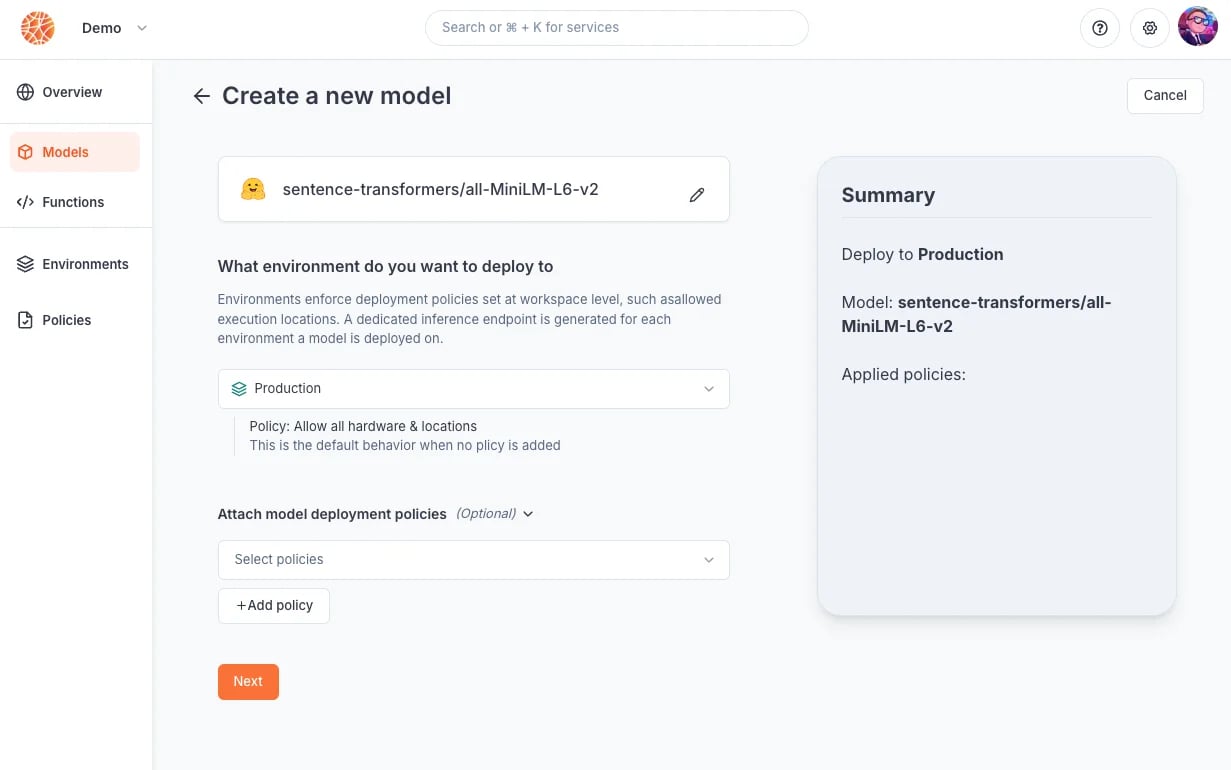
When using the Blaxel console, you can update all model configurations (model file, runtime, etc.) except policies by selecting ***Deploy a new version***.
### Updating a model version
As you iterate on software development, you will need to update the version of a model that is currently deployed and used by your consumers.
One way to manage this is through multiple [environments](../Model-Governance/Environments), and [releasing](/Models/Model-deployment) the model version that is on one environment (e.g. development) to another environment (e.g. production). Another more straightforward way is to directly update a model deployment on an environment.
When updating a model deployment, you can:
* update the underlying model file/origin
* update the inference runtime for the model
* update the policies directly attached to the model deployment
Model deployments are updated following a **blue-green** paradigm. The Global Inference Network will wait for the new version to be completely up and ready before routing inference requests to the new deployment.
When using the Blaxel console, you can update all model configurations (model file, runtime, etc.) except policies by selecting ***Deploy a new version***.
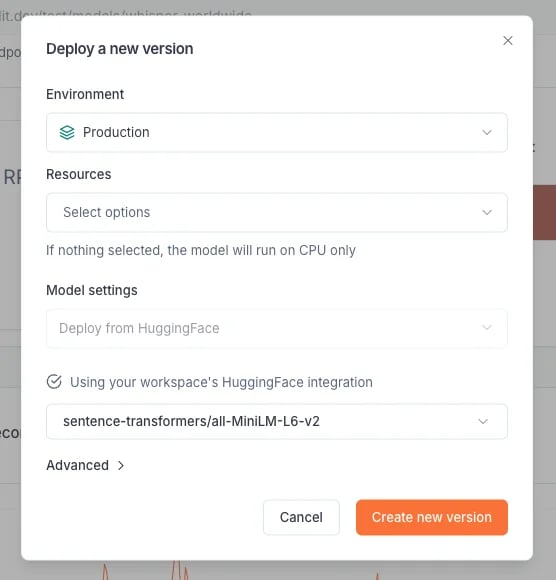 To update the policies of a model deployment using the Blaxel console, go to the ***Policies*** page and edit them here.
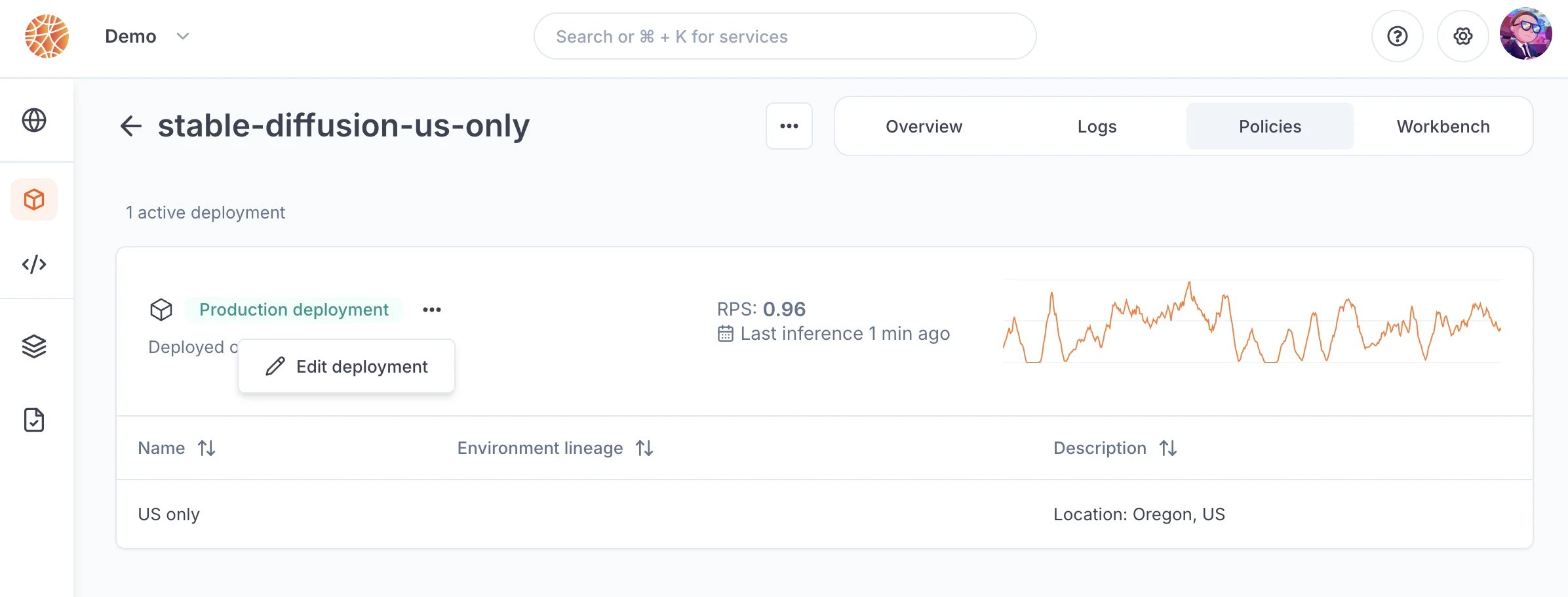 Model deployments can also be updated via the Blaxel [APIs](https://docs.blaxel.ai/api-reference/models/create-or-update-model-deployment) or [CLI](https://docs.blaxel.ai/cli-reference/bl_apply).
### Deactivating a model deployment
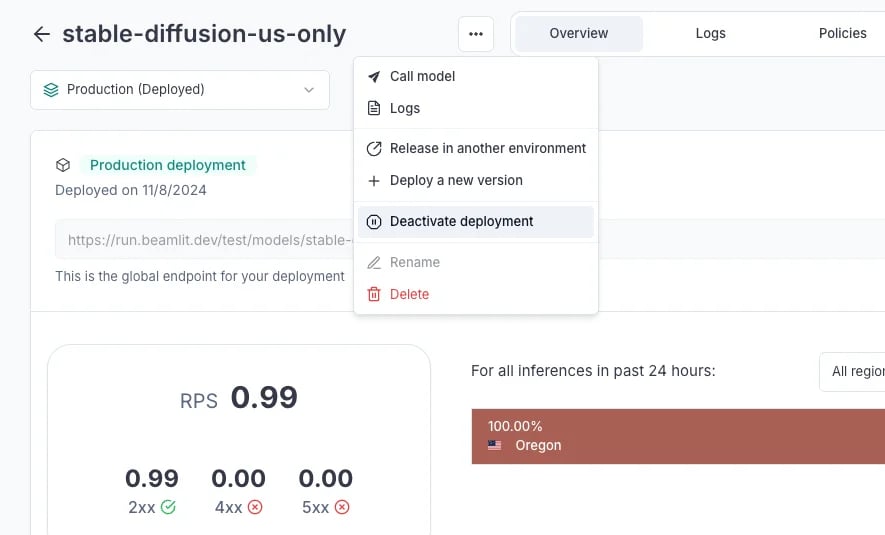
Any model deployment can be deactivated at any time. When deactivated, it will **no longer be reachable** through the inference endpoint and will stop consuming resources.
Models can be deactivated and activated at any time from the Blaxel console, or via [API](https://docs.blaxel.ai/api-reference/models/create-or-update-model-deployment) or [CLI](https://docs.blaxel.ai/cli-reference/bl_apply).
Model deployments can also be updated via the Blaxel [APIs](https://docs.blaxel.ai/api-reference/models/create-or-update-model-deployment) or [CLI](https://docs.blaxel.ai/cli-reference/bl_apply).
### Deactivating a model deployment
Any model deployment can be deactivated at any time. When deactivated, it will **no longer be reachable** through the inference endpoint and will stop consuming resources.
Models can be deactivated and activated at any time from the Blaxel console, or via [API](https://docs.blaxel.ai/api-reference/models/create-or-update-model-deployment) or [CLI](https://docs.blaxel.ai/cli-reference/bl_apply).
 ## Deployment reference
### Model origins
Blaxel supports the following origins for models:
* **Uploading a file.** Use a static file containing the model. Uploading through the interface has a limit of 5GB, else you must use the CLI.
* For the moment, Blaxel only supports uploading Torch-based models. We are currently working on extending model support, please reach out if you need a specific model type.
* Supported extensions: `.MAR` only
* **HuggingFace.** Blaxel will use your [workspace integration](../Integrations/HuggingFace) to retrieve any model deployed on HuggingFace. For private models, it will only be able to retrieve models within the scope of allowed models for your HuggingFace token.
Read about [the API parameters in the reference](https://docs.blaxel.ai/api-reference/models/create-or-update-model-deployment).
### Runtime
Blaxel suggests an optimized inference runtime for each model you attempt to deploy. You can override it by passing the Docker image for a custom inference runtime when deploying the model.
Blaxel natively supports the following runtimes:
* **Blaxel Transformers/Diffusers**: our optimized inference engine made for Transformers and Diffusers models
* **Blaxel Torch**: our optimized inference engine made for Torch-based models
* **TGI**
* **TEI**
### Environment
You must choose an [environment](../Model-Governance/Environments) when deploying a model on Blaxel. Environments allow you to pre-attach [policies](../Model-Governance/Policies) to a model deployment (for example: to make it so the model only runs in certain countries, or on a certain hardware).
### Policies
Additional [policies](../Model-Governance/Policies) can be optionally attached to a model deployment directly. If there already are policies set in the environment, policies of the **same policy type** (e.g. location-based, flavor-based, etc.) will collide. In this case, the result will be [as described here](../Model-Governance/Policies).
### Resources
Blaxel allows you to specify which flavors (i.e., which CPU types) should be used for running a particular model.
Flavors refer to the specific CPU types that the model deployment will use for processing inferences. During inference execution, the Global Inference Network intelligently routes each request to a location containing the desired CPU types. It then schedules the workload based on resource availability, ensuring optimal performance.
You can only select flavors allowed by the policies set in the environment or the deployment.
## Deploy a replica of an on-prem model
Minimal-footprint deployments can be set up by referencing a model deployed on your own private infrastructure (on-prem or cloud) and making it overflow on Blaxel only in case of unexpected burst traffic or infrastructure failure.
Learn how to deploy public or private AI models from HuggingFace on Blaxel.
## Deployment reference
### Model origins
Blaxel supports the following origins for models:
* **Uploading a file.** Use a static file containing the model. Uploading through the interface has a limit of 5GB, else you must use the CLI.
* For the moment, Blaxel only supports uploading Torch-based models. We are currently working on extending model support, please reach out if you need a specific model type.
* Supported extensions: `.MAR` only
* **HuggingFace.** Blaxel will use your [workspace integration](../Integrations/HuggingFace) to retrieve any model deployed on HuggingFace. For private models, it will only be able to retrieve models within the scope of allowed models for your HuggingFace token.
Read about [the API parameters in the reference](https://docs.blaxel.ai/api-reference/models/create-or-update-model-deployment).
### Runtime
Blaxel suggests an optimized inference runtime for each model you attempt to deploy. You can override it by passing the Docker image for a custom inference runtime when deploying the model.
Blaxel natively supports the following runtimes:
* **Blaxel Transformers/Diffusers**: our optimized inference engine made for Transformers and Diffusers models
* **Blaxel Torch**: our optimized inference engine made for Torch-based models
* **TGI**
* **TEI**
### Environment
You must choose an [environment](../Model-Governance/Environments) when deploying a model on Blaxel. Environments allow you to pre-attach [policies](../Model-Governance/Policies) to a model deployment (for example: to make it so the model only runs in certain countries, or on a certain hardware).
### Policies
Additional [policies](../Model-Governance/Policies) can be optionally attached to a model deployment directly. If there already are policies set in the environment, policies of the **same policy type** (e.g. location-based, flavor-based, etc.) will collide. In this case, the result will be [as described here](../Model-Governance/Policies).
### Resources
Blaxel allows you to specify which flavors (i.e., which CPU types) should be used for running a particular model.
Flavors refer to the specific CPU types that the model deployment will use for processing inferences. During inference execution, the Global Inference Network intelligently routes each request to a location containing the desired CPU types. It then schedules the workload based on resource availability, ensuring optimal performance.
You can only select flavors allowed by the policies set in the environment or the deployment.
## Deploy a replica of an on-prem model
Minimal-footprint deployments can be set up by referencing a model deployed on your own private infrastructure (on-prem or cloud) and making it overflow on Blaxel only in case of unexpected burst traffic or infrastructure failure.
Learn how to deploy public or private AI models from HuggingFace on Blaxel.